How Images and Media Should Be Used
Images and media support written content by adding context, visual interest and clarity. When used correctly, they enhance accessibility, improve SEO and ensure compliance with WCAG standards.
These standards apply to all Citadel webpages and are required to meet accessibility, SEO and content clarity expectations.
File Names | Alternative Text | Video Usage Standards | Branding Standards
Image and Media File Names
Always rename image and document files before uploading them to the WordPress Media Library.
Clear, descriptive filenames help search engines, assistive technologies and users understand the content and purpose of the file.
Do:
- Use descriptive, meaningful filenames that reflect the image or document content
- Use hyphens (-) to separate words
- Include relevant keywords when appropriate
Avoid:
- Default camera filenames (e.g., IMG_1234)
- Vague or generic names
- Underscores (_) or spaces in filenames
File Naming Examples
| Good Example | Poor Example |
|---|---|
| citadel-cadet-parade-2025.jpg | IMG_9384.jpg |
| business-faculty-profile-jane-doe.png | Final_headshot2.png |
| psychology-ma-program-overview.pdf | document(1).pdf |
Alternative Descriptions (Alt Text)
Alternative text (alt text) describes the information conveyed by an image, chart, graph or visual element. When a screen reader encounters an image, the alt text is read aloud to the user.
Alt text is required for all images, tables and graphs to meet WCAG 2.1 AA accessibility standards.
Write Clear, Descriptive Alt Text
Alt text should clearly communicate the purpose and content of the image.
Do:
- Write a short description (one sentence or less)
- Include key details or context (who, what, where)
- Describe the information conveyed by charts or graphs
- Mark purely decorative images as Decorative
Avoid:
- Leaving alt text blank (unless the image is decorative)
- Using vague descriptions such as “image” or “photo”
- Repeating surrounding text verbatim
Alt Text Examples
| Image | Good Alt Text | Poor Alt Text |
|---|---|---|
 | Cadet standing on a balcony at sunset, overlooking The Citadel’s tower and barracks. | cadet image |
 | U.S. News & World Report Best Colleges 2026 – Regional Universities South. | *blank* |
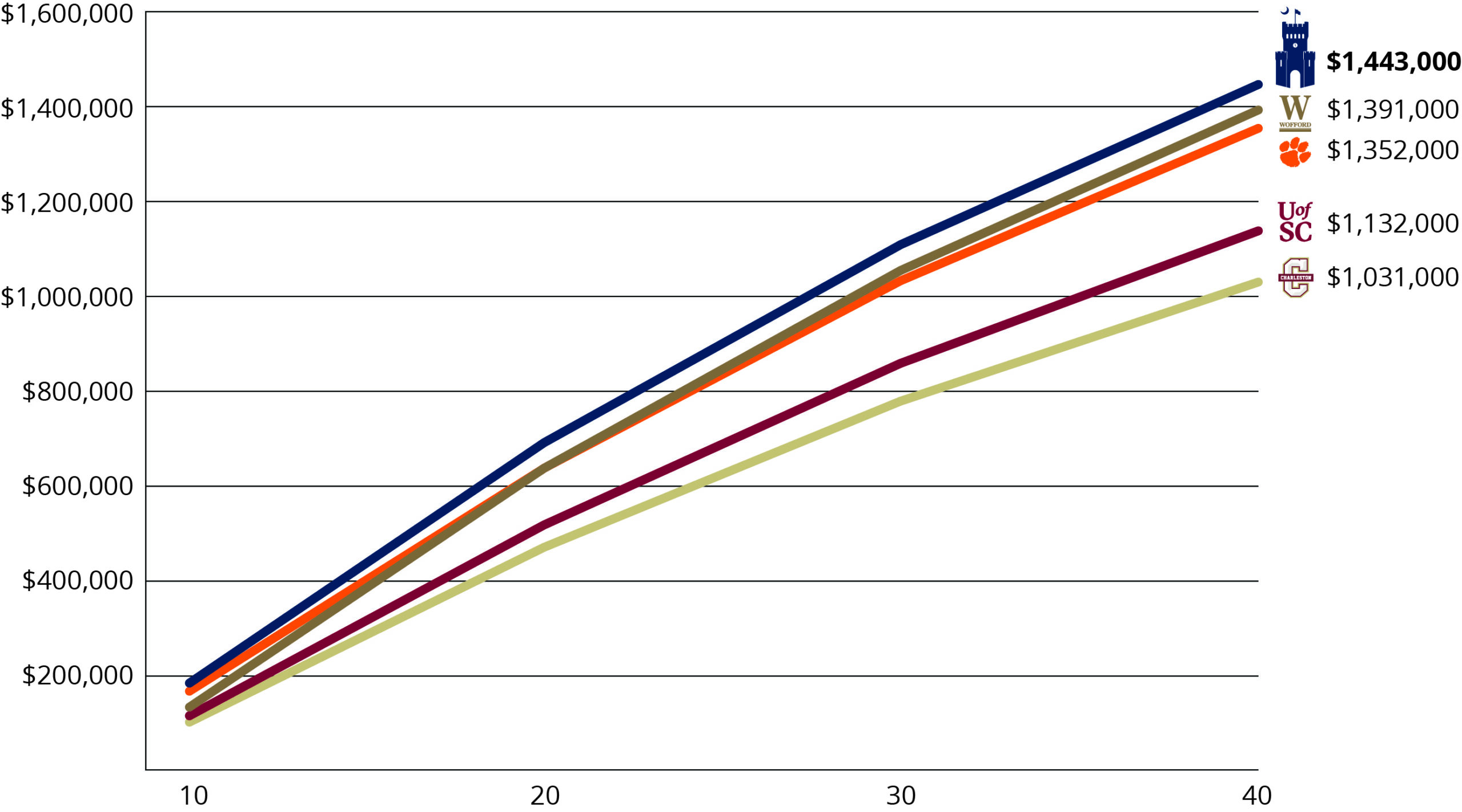 | Line graph comparing 40-year return on investment for colleges. The Citadel ranks highest at $1,443,000, followed by Wofford, Clemson, University of South Carolina, and College of Charleston. | ROI graph |
Adding Alt Text in WordPress
Alt text can be added in two locations within WordPress.
From the Page Editor
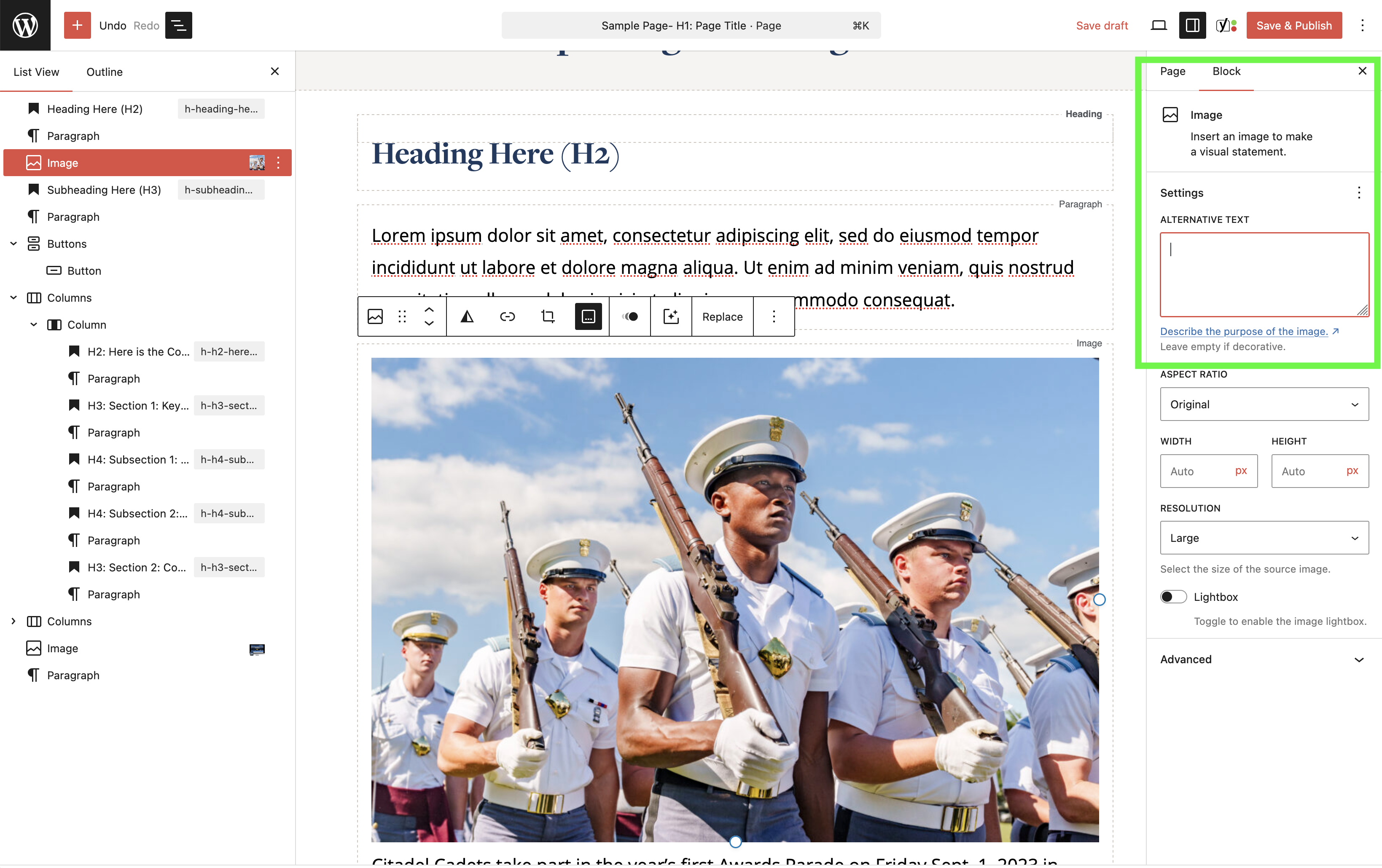
- Select the image block
- Enter the description in the Alt Text field in the settings panel
From the Media Library
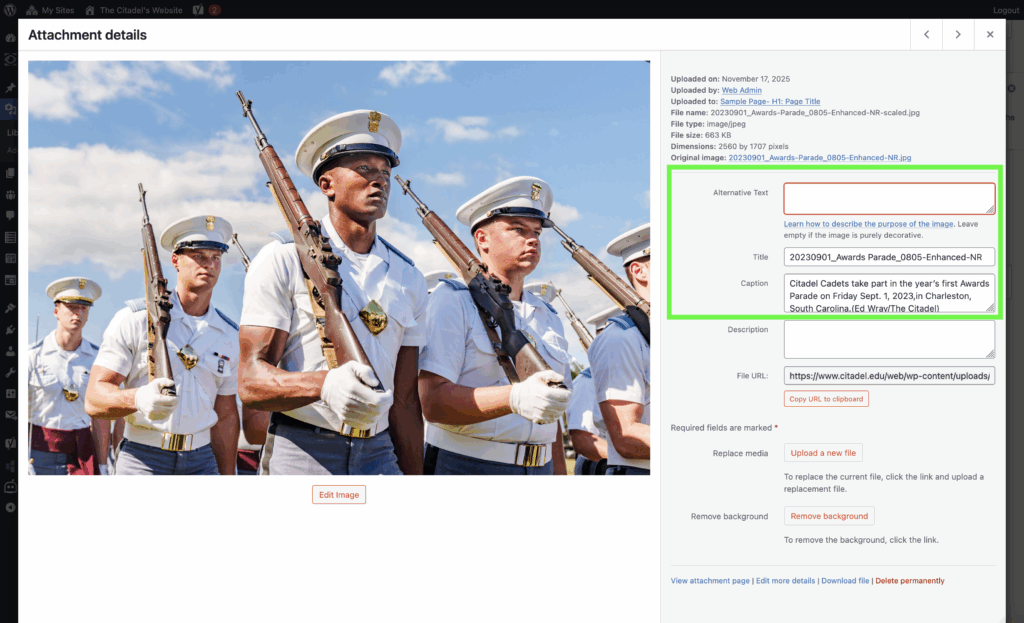
- Open the image in the Media Library
- Enter alt text in the Alt Text field
- This text will be used wherever the image appears on the site
Video Usage Standards
Videos must be accessible, current and publicly viewable to be used on Citadel webpages. Videos should reflect current policies, branding and campus expectations.
Do:
- Ensure videos are set to public or unlisted
- Confirm videos can be viewed by users who are not logged in
- Use captions when available to support accessibility
- Review videos regularly to ensure content remains accurate
- Replace outdated videos when information or visuals change
Avoid:
- Embedding videos set to private
- Linking to videos that require special permissions to view
- Using videos with outdated guidance or visuals (for example, COVID mask requirements when no longer applicable)
Visual Branding and Graphic Standards
Images and graphics must align with Citadel brand guidelines and visual standards.
Do:
- Use official photography and approved graphics
- Ensure visuals are consistent with Citadel branding and tone
- Select images that support the message and purpose of the page
Avoid:
- Creating and uploading custom graphics based on personal preference
- Using visuals that do not follow Citadel branding standards
Need a Custom Graphic?
Submit a request through the OCM Request Form.
Reference the Brand and Visual Standards for approved styles and guidance.